

Usecases
Featured Post
Latest Posts
Usecases
Featured Post
Latest Posts
Back to blogs
Tutorials
Beyond the Pixel: Mastering Meta’s Conversion API for Powerful Event Tracking
By
Abhimanyu Atri
Marketing Product Manager
1 min read

Image by Prodeep Ahmeed from Pixabay
TLDR
Why tracking broke: not cookies. Google reversed Chrome's third-party cookie phase-out in 2025. The damage came from Apple's App Tracking Transparency, browser tracking prevention, and ad blockers.
What CAPI does: sends conversion events from your server instead of the visitor's browser, so a purchase still registers when the Pixel never fires.
Pixel or CAPI: both. They catch different gaps, and Meta deduplicates as long as each event carries the same
event_nameandevent_id.What matters most in 2026: Event Match Quality, scored 0 to 10. Above roughly 7 unlocks better optimization, and hashed email moves it more than any other parameter.
What it costs: CAPI is free. Setup runs from a free Shopify app in an hour or two, to a GTM container with monthly hosting, to a developer build over several days.
Ad tracking has changed more in the last five years than in the decade before it. Mobile devices took over browsing, privacy laws tightened, and platforms rewrote how they measure user behavior. Meta's Conversion API (CAPI) sits at the center of that shift. It's a server-side tracking tool that gives advertisers a reliable way to send conversion data to Meta, even when a user's browser blocks the usual tracking scripts.
This guide breaks down how CAPI actually works, how it stacks up against the Meta Pixel, what changed with Meta's April 2026 update, and how to implement it without a full engineering team.
Why did browser-based tracking break down, and what's really driving change in 2026?
Most CAPI articles open with the same line: third-party cookies are disappearing. That story is out of date. Google reversed its plan to phase out third-party cookies in Chrome in April 2025, and cookies still work by default in Chrome today. If cookie deprecation was the reason you started looking into CAPI, that particular fire has cooled.
The real disruption came from somewhere else. Apple rolled out iOS 14.5 in 2021 with App Tracking Transparency (ATT), and it let users block cross-app tracking with a single tap. Ad performance dropped fast for advertisers who relied entirely on browser-based measurement, and it never fully recovered. Safari's Intelligent Tracking Prevention and Firefox's Enhanced Tracking Protection added additional limits on top of that, and privacy laws like GDPR and CCPA pushed businesses to handle user data with greater care and transparency.
Meta built the Conversion API to answer this problem directly. Instead of relying on a script running in a user's browser, CAPI lets your server send event data directly to Meta. That single change fixes most of the signal loss caused by ATT, ad blockers, and tracking-prevention tools, and it does so without asking users to give up any privacy protections they already have.
What core technologies behind server-side tracking?
Before you touch any code, it helps to understand a few concepts that CAPI depends on.
What's the difference between client-side and server-side tracking?
The Meta Pixel runs client-side. It's a JavaScript snippet that runs in the user's browser every time they load a page or take an action, and it relies on the browser environment and third-party cookies to match activity back to a Meta profile. CAPI runs server-side instead. Your own server collects the event and sends it directly to Meta, so ad blockers and browser restrictions can't get in the way.
Why do first-party cookies still matter?
Most brands that adopt CAPI also lean more heavily on first-party cookies, the ones your own website sets rather than third-party ones. Even with cookies restricted elsewhere, your server can still recognize returning users, with their consent, because that data belongs to your domain, not someone else's.
How does data hashing protect user privacy?
Hashing turns personal data, such as an email address or phone number, into a one-way cryptographic hash. CAPI requires this step for personally identifiable information. Meta can match a hashed value to a user profile without ever seeing the original data in plain text, which keeps the process private on both ends.
Why does Meta recommend domain verification?
Domain verification proves you're authorized to send events for a given domain. It also protects against link ownership issues and prevents bad actors from sending fake data into your Ads Manager account.
What data governance rules apply to CAPI?
Server-to-server tracking doesn't exempt you from consent rules. Your privacy policy and cookie banners must accurately reflect how you collect and process user data, and you must respect whatever choice a user makes about tracking.
What is the Meta Conversion API, and how does it work?
Conversion API is a server-to-server integration. It lets your system, whether that's your website's backend or an offline database, send user interaction data directly to Meta without routing it through a browser.
What role does CAPI play in ad campaigns?
CAPI improves three things at once. It makes your data more reliable, since events don't depend on a browser script surviving ad blockers or page timeouts. It sharpens attribution, since Meta can tie the same user action to a campaign more consistently. And it keeps you in control of privacy, since you decide exactly which parameters to send and how to hash them before they leave your server.
What are the main use cases for CAPI?
Three use cases show up most often in D2C and e-commerce:
E-commerce purchases: confirming sales and revenue data so campaigns optimize for real ROAS, not just clicks.
Lead generation: sending form completions and sign-ups, usually with hashed contact data attached.
Offline conversions: pushing data from phone calls or in-store purchases back into Meta, so online ads get credit for offline results.
What's the difference between Meta Pixel and Conversion API?
The Meta Pixel changed ad tracking when it launched, letting advertisers install one script and measure actions in real time. Browsers have since made that job harder. Safari's ITP and Firefox's ETP block third-party cookies by default, which cuts into the Pixel's reach. Ad blockers stop pixel scripts from loading for a meaningful share of users. And if someone closes their browser the moment after a purchase, a pixel-based event might never fire at all.
CAPI solves the last problem directly. Your backend can confirm and send a conversion even after the user's browser session ends, because the confirmation happens on your server, not in their browser. That's the core difference: Pixel shows what a browser was able to observe, and CAPI shows what your server can confirm actually happened.
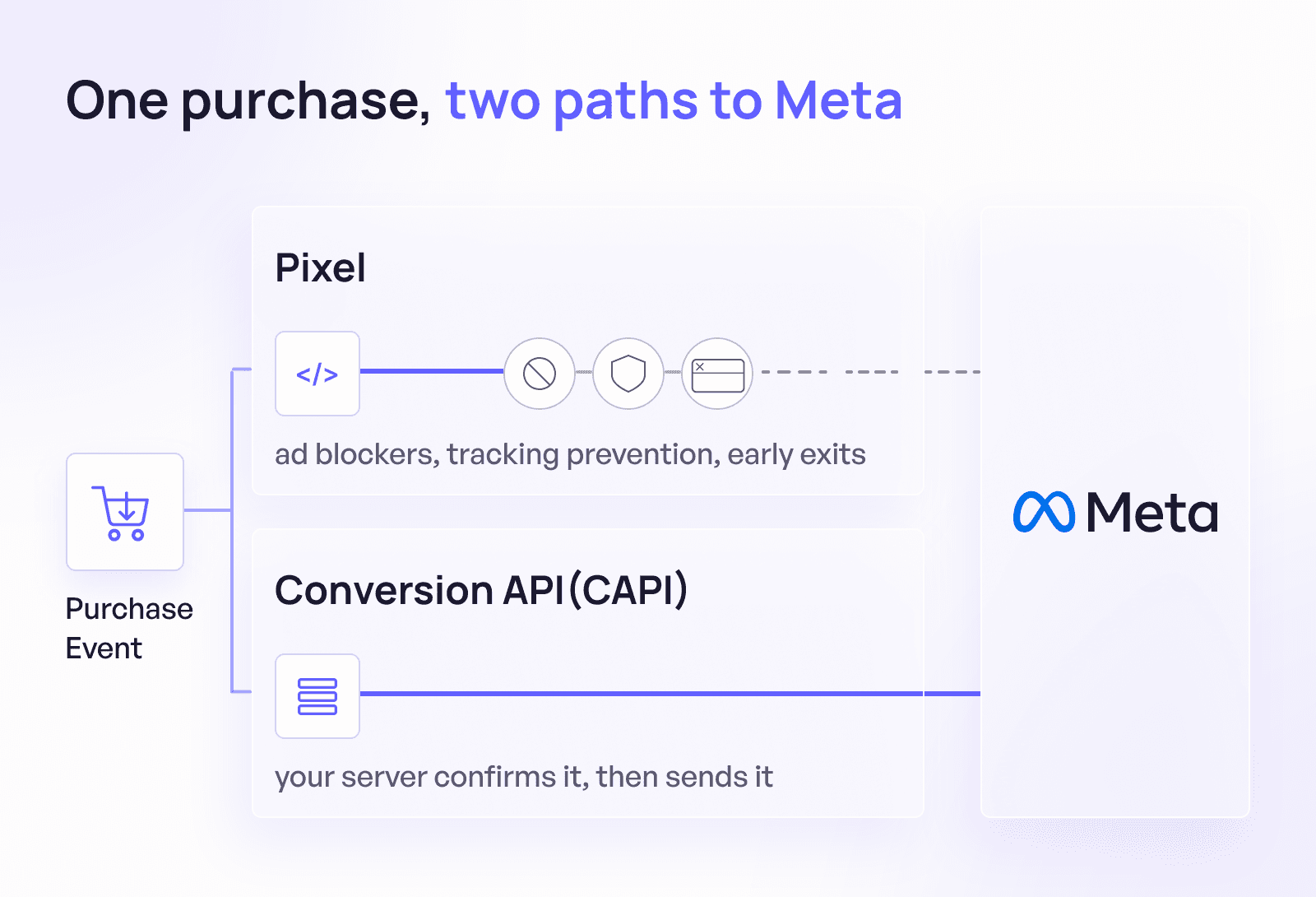
Figure 1. Difference between Client Side Pixel tracking and Meta's Conversion API(CAPI)
Most advertisers get the best results running both together, not choosing one over the other. Meta itself recommends dual tracking, since Pixel and CAPI catch different gaps and cross-check each other's data.
How does Conversion API work, step by step?
Here's what happens behind the scenes for a typical online purchase, using a jewelry retailer as an example:
A user clicks a Meta ad and lands on the site.
The user adds a ring to their cart, and the server logs that action, capturing whatever fields the business needs, such as product ID, price, or hashed email.
The server formats that event to match Meta's requirements, adding a unique event_id and hashing personal identifiers.
The server sends the event to Meta over a secure HTTPS request through the Conversion API endpoint.
Meta matches the hashed identifiers to a user profile, attributes the event to the right campaign, and feeds it into reporting and optimization.
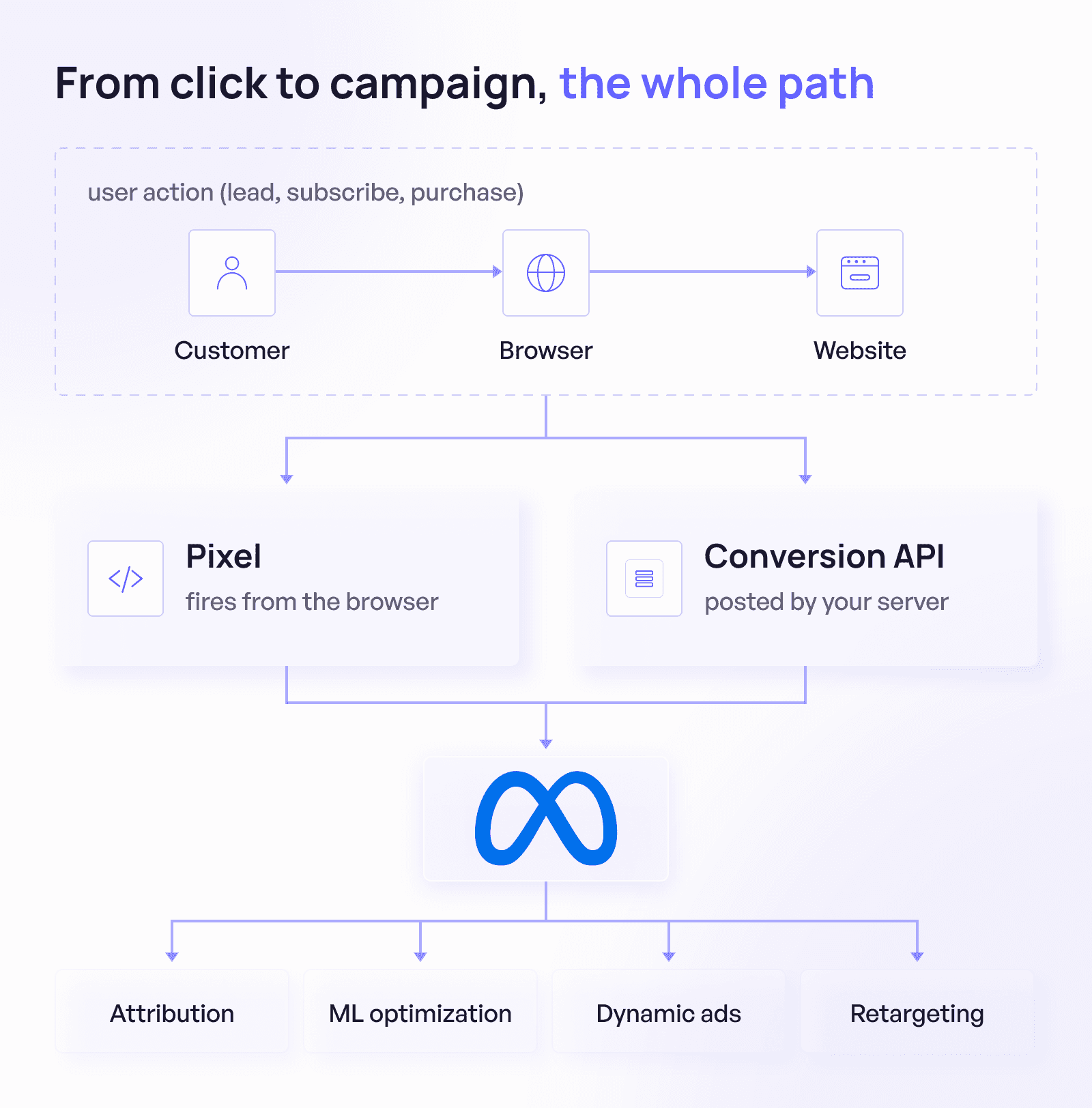
Figure 2. How Meta's Conversion API (CAPI) works
This approach holds up even when a user closes their browser or blocks JavaScript, because the server confirms the action independently of whatever happens on the user's device.
What events and parameters can you track with CAPI?
CAPI can track anything the Pixel tracks, and it adds a few options the Pixel can't offer on its own.
What standard events does Meta recognize?
Purchase: a completed transaction with value and currency attached.
AddToCart: an item added to a cart but not yet purchased.
InitiateCheckout: the start of a checkout flow.
Lead: a form submission or other lead-worthy action.
CompleteRegistration: a sign-up for a service or event.
Meta's algorithm is trained around these standard events, which makes them the strongest starting point for most campaigns.
What custom events can you create?
Custom events let you track actions specific to your business. A B2B brand might track DownloadWhitepaper for an early-funnel lead magnet, WatchWebinar for product demo engagement, or QuizCompletion for an interactive lead-qualification flow.
What customer parameters improve match quality?
The more identifying data you send, especially high-priority fields, the better Meta can match an event to a real user. Hashed email carries the most weight, followed by hashed phone number and external ID. Fields like date of birth, gender, or ZIP code carry less weight but still help at the margins.
What is event match quality, and why does it matter most in 2026?
Event Match Quality (EMQ) has become the metric that matters most in Meta advertising this year, more than budget and more than targeting. Meta scores EMQ from 0 to 10 based on how many of your sent events match to a known Meta user. A score above roughly 7 tends to unlock noticeably better optimization, while a low score means Meta's algorithm doesn't have enough clean signal to work with, regardless of how much you spend.
This shift matters because Meta's automated bidding systems, including Advantage+ campaigns, depend entirely on the quality of the data they receive. Better creative and bigger budgets used to be the main levers for performance. In 2026, clean, well-matched conversion data has become the precondition for those other levers to work at all. Read more on how to improve your Event Match Quality (EMQ) here.
Is Meta Conversion API free? What changed in April 2026?
Yes, Conversion API itself is free to use. Any cost comes from how you implement it: a Shopify or WooCommerce partner integration is typically free, a server-side GTM container runs roughly 10 to 50 dollars a month in hosting, and custom developer builds can range from a few hundred to a few thousand dollars depending on complexity.
Meta lowered that barrier further in April 2026. The company announced an AI-assisted upgrade to the Pixel that automatically attaches product names, prices, and availability to events, plus a one-click Conversions API setup that removes the server configuration work almost entirely. According to Meta's own figures, advertisers using Conversions API for web events saw an average 17.8% lower cost per result compared to advertisers who skipped it. That number comes from Meta directly rather than an independent audit, so treat it as a strong directional signal rather than a guaranteed outcome for every account.
For smaller teams that held off on CAPI because it felt like an engineering project, that objection has mostly disappeared. The setup that used to take a developer a day now takes a few clicks inside Events Manager.
How do you implement CAPI?
Your best implementation path depends on your platform and your team's technical resources.
Should you use direct API integration?
Direct integration makes sense if you have a development team that can handle HTTP requests, error handling, and data transformation. It gives you the most flexibility, including full control over offline conversions and advanced logic, but it also demands ongoing maintenance as Meta updates its API.
How does Shopify's Conversion API integration work?
If your store runs on Shopify, WooCommerce, or WordPress, you likely don't need custom code at all. Shopify's official CAPI integration is free and typically takes one to two hours to set up, guiding you through connecting to Meta and choosing which events to track. The tradeoff is flexibility: partner integrations may limit which events or parameters you can customize for a highly specific funnel.
What is server-side tag management?
If you already manage tags through Google Tag Manager, a server-side container gives you a modular way to route data to Meta and other platforms from one place. It improves performance and reduces client-side bloat, but it requires setting up a server container, usually through Google Cloud or AWS, along with the monthly hosting cost that comes with it.
When should you use a customer data platform?
Larger businesses running a dedicated CDP, like Segment or mParticle, can usually enable Meta CAPI as an output destination with minimal setup. This centralizes data governance and pairs well with sending the same data to multiple ad platforms at once, though CDPs carry real cost and often more functionality than a smaller business needs.
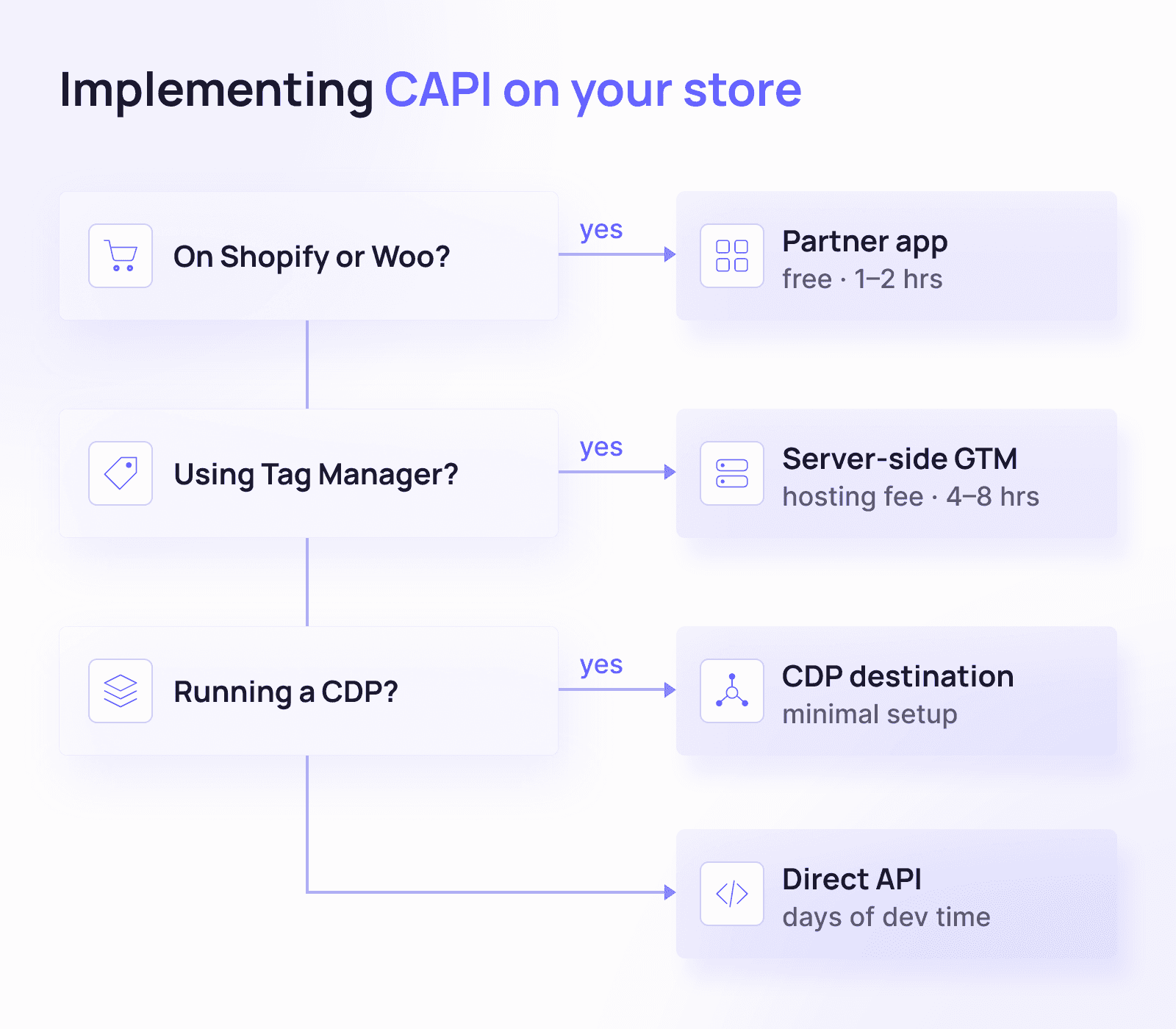
Figure 3. How to implement CAPI on your store
What are the best practices for CAPI implementation?
Test every event in Meta's Event Manager before trusting the data.
Hash sensitive identifiers, like emails and phone numbers, before you send them.
Keep event_name and event_id consistent across Pixel and CAPI so deduplication works correctly.
Run Pixel and CAPI in parallel at first, so you can compare the two data sets before relying on CAPI alone.
How do you know if CAPI is working?
Once events start flowing, your data shows up in Meta's Ads Manager or Events Manager, where you can review conversion volume, optimize bidding around your most valuable events, and track ROAS more accurately because the purchase values feeding your reports are more complete.
Two supporting metrics are worth tracking alongside Meta's own dashboard. Marketing Efficiency Ratio (MER), your total revenue divided by total ad spend from your own backend, gives you a number that attribution windows can't distort. Customer Acquisition Cost (CAC) tells you whether CAPI's improved signal is actually finding new customers, not just matching more of the ones you already had. Neither metric replaces Meta's reporting, but both catch problems that in-platform attribution alone tends to miss.
For deeper measurement work, Conversion Lift and Brand Lift studies show the incremental impact of your campaigns rather than just the reported numbers.
The bottom line on Meta's conversion API in 2026
Cookies aren't the crisis anymore. iOS-driven privacy changes and browser restrictions are, and they aren't going away. Meta's Conversion API gives you a direct, privacy-respecting line to send accurate data even when a browser can't. With CAPI now free and easier to set up than it's ever been, and with Event Match Quality driving more of your campaign performance than budget alone, there's very little reason left to run Pixel without it. Whether you connect through Shopify's built-in integration, a server-side container, or a custom build, the goal stays the same: give Meta's algorithm the clean signal it needs to find the right people and spend your budget well.
Frequently asked questions
What is Meta Conversion API used for?
Meta Conversion API sends conversion events, like purchases, leads, or sign-ups, directly from your server to Meta. It helps advertisers track actions accurately even when a browser blocks the usual tracking script.
Do I still need the Meta Pixel if I use CAPI?
Yes, in most cases. Meta recommends running Pixel and CAPI together, since the Pixel captures real-time browser context that a server can't see, and CAPI catches events the Pixel misses. If either one fires but the other doesn't, Meta still gets the conversion.
Is Meta Conversion API free?
Conversion API itself has no cost. Any expense comes from your implementation method: a Shopify or WooCommerce integration is usually free, server-side tag management runs a modest monthly hosting fee, and custom development costs depend on how complex your setup needs to be.
How long does it take to set up CAPI?
It depends on your platform. A Shopify integration typically takes one to two hours. Server-side GTM setups take longer, often four to eight hours. Custom API builds can take several days of developer time, though Meta's one-click setup, introduced in April 2026, has cut that timeline down for many advertisers.
What is Event Match Quality, and how is it scored?
Event Match Quality (EMQ) measures how well Meta can match the events you send to a real user, on a scale from 0 to 10. Higher scores, generally above 7, tend to produce better optimization and more stable campaign performance. Sending more high-priority parameters, like hashed email and phone number, is the most reliable way to raise your score.
Is Conversion API better than Pixel?
It's better described as complementary rather than better. CAPI catches conversions the Pixel misses due to ad blockers or early browser exits, while the Pixel still captures certain real-time browser behavior CAPI can't see on its own. Running both gives you more complete data than either one alone.
Does CAPI replace third-party cookies?
Not exactly, and the framing has changed recently. Chrome never eliminated third-party cookies as planned; Google reversed that deprecation in 2025. CAPI matters less because cookies are disappearing and more because browser restrictions, ad blockers, and privacy features like Apple's App Tracking Transparency already limit what a browser-based script can see.
Can I use CAPI without a developer?
Yes. Platform integrations, like Shopify's official Meta app, or Meta's one-click Conversions API setup from April 2026, let you connect CAPI without writing code. You'll have less customization than a direct API integration, but you also skip the engineering overhead.
Does Shopify support Conversion API?
Yes. Shopify offers an official, free CAPI integration through its app connection to Meta, and setup usually takes one to two hours. It covers standard events like Purchase and AddToCart automatically, without custom development.
What happens if the Pixel and CAPI send the same event twice?
Meta deduplicates the event, as long as both the Pixel and CAPI use the same event_name and event_id for that action. Without matching identifiers, you risk double-counting conversions and inflating your reported numbers.
Can CAPI track offline conversions?
Yes. CAPI can send data from offline actions, like a phone call that leads to a sale or an in-store purchase, using the same API endpoint as online events. The main difference is the action_source field, which identifies the event as coming from a physical store, call center, or CRM instead of a website.
Why did my Pixel-only tracking start missing conversions?
Apple's iOS 14.5 update in 2021 let users block cross-app tracking, which cut off a large share of the data Pixel-only setups depended on. Ad blockers and browser features like Safari's Intelligent Tracking Prevention add further gaps. CAPI closes most of that hole because it confirms conversions from your server rather than depending on a script surviving in the user's browser.
Ad tracking has changed more in the last five years than in the decade before it. Mobile devices took over browsing, privacy laws tightened, and platforms rewrote how they measure user behavior. Meta's Conversion API (CAPI) sits at the center of that shift. It's a server-side tracking tool that gives advertisers a reliable way to send conversion data to Meta, even when a user's browser blocks the usual tracking scripts.
This guide breaks down how CAPI actually works, how it stacks up against the Meta Pixel, what changed with Meta's April 2026 update, and how to implement it without a full engineering team.
Why did browser-based tracking break down, and what's really driving change in 2026?
Most CAPI articles open with the same line: third-party cookies are disappearing. That story is out of date. Google reversed its plan to phase out third-party cookies in Chrome in April 2025, and cookies still work by default in Chrome today. If cookie deprecation was the reason you started looking into CAPI, that particular fire has cooled.
The real disruption came from somewhere else. Apple rolled out iOS 14.5 in 2021 with App Tracking Transparency (ATT), and it let users block cross-app tracking with a single tap. Ad performance dropped fast for advertisers who relied entirely on browser-based measurement, and it never fully recovered. Safari's Intelligent Tracking Prevention and Firefox's Enhanced Tracking Protection added additional limits on top of that, and privacy laws like GDPR and CCPA pushed businesses to handle user data with greater care and transparency.
Meta built the Conversion API to answer this problem directly. Instead of relying on a script running in a user's browser, CAPI lets your server send event data directly to Meta. That single change fixes most of the signal loss caused by ATT, ad blockers, and tracking-prevention tools, and it does so without asking users to give up any privacy protections they already have.
What core technologies behind server-side tracking?
Before you touch any code, it helps to understand a few concepts that CAPI depends on.
What's the difference between client-side and server-side tracking?
The Meta Pixel runs client-side. It's a JavaScript snippet that runs in the user's browser every time they load a page or take an action, and it relies on the browser environment and third-party cookies to match activity back to a Meta profile. CAPI runs server-side instead. Your own server collects the event and sends it directly to Meta, so ad blockers and browser restrictions can't get in the way.
Why do first-party cookies still matter?
Most brands that adopt CAPI also lean more heavily on first-party cookies, the ones your own website sets rather than third-party ones. Even with cookies restricted elsewhere, your server can still recognize returning users, with their consent, because that data belongs to your domain, not someone else's.
How does data hashing protect user privacy?
Hashing turns personal data, such as an email address or phone number, into a one-way cryptographic hash. CAPI requires this step for personally identifiable information. Meta can match a hashed value to a user profile without ever seeing the original data in plain text, which keeps the process private on both ends.
Why does Meta recommend domain verification?
Domain verification proves you're authorized to send events for a given domain. It also protects against link ownership issues and prevents bad actors from sending fake data into your Ads Manager account.
What data governance rules apply to CAPI?
Server-to-server tracking doesn't exempt you from consent rules. Your privacy policy and cookie banners must accurately reflect how you collect and process user data, and you must respect whatever choice a user makes about tracking.
What is the Meta Conversion API, and how does it work?
Conversion API is a server-to-server integration. It lets your system, whether that's your website's backend or an offline database, send user interaction data directly to Meta without routing it through a browser.
What role does CAPI play in ad campaigns?
CAPI improves three things at once. It makes your data more reliable, since events don't depend on a browser script surviving ad blockers or page timeouts. It sharpens attribution, since Meta can tie the same user action to a campaign more consistently. And it keeps you in control of privacy, since you decide exactly which parameters to send and how to hash them before they leave your server.
What are the main use cases for CAPI?
Three use cases show up most often in D2C and e-commerce:
E-commerce purchases: confirming sales and revenue data so campaigns optimize for real ROAS, not just clicks.
Lead generation: sending form completions and sign-ups, usually with hashed contact data attached.
Offline conversions: pushing data from phone calls or in-store purchases back into Meta, so online ads get credit for offline results.
What's the difference between Meta Pixel and Conversion API?
The Meta Pixel changed ad tracking when it launched, letting advertisers install one script and measure actions in real time. Browsers have since made that job harder. Safari's ITP and Firefox's ETP block third-party cookies by default, which cuts into the Pixel's reach. Ad blockers stop pixel scripts from loading for a meaningful share of users. And if someone closes their browser the moment after a purchase, a pixel-based event might never fire at all.
CAPI solves the last problem directly. Your backend can confirm and send a conversion even after the user's browser session ends, because the confirmation happens on your server, not in their browser. That's the core difference: Pixel shows what a browser was able to observe, and CAPI shows what your server can confirm actually happened.

Figure 1. Difference between Client Side Pixel tracking and Meta's Conversion API(CAPI)
Most advertisers get the best results running both together, not choosing one over the other. Meta itself recommends dual tracking, since Pixel and CAPI catch different gaps and cross-check each other's data.
How does Conversion API work, step by step?
Here's what happens behind the scenes for a typical online purchase, using a jewelry retailer as an example:
A user clicks a Meta ad and lands on the site.
The user adds a ring to their cart, and the server logs that action, capturing whatever fields the business needs, such as product ID, price, or hashed email.
The server formats that event to match Meta's requirements, adding a unique event_id and hashing personal identifiers.
The server sends the event to Meta over a secure HTTPS request through the Conversion API endpoint.
Meta matches the hashed identifiers to a user profile, attributes the event to the right campaign, and feeds it into reporting and optimization.

Figure 2. How Meta's Conversion API (CAPI) works
This approach holds up even when a user closes their browser or blocks JavaScript, because the server confirms the action independently of whatever happens on the user's device.
What events and parameters can you track with CAPI?
CAPI can track anything the Pixel tracks, and it adds a few options the Pixel can't offer on its own.
What standard events does Meta recognize?
Purchase: a completed transaction with value and currency attached.
AddToCart: an item added to a cart but not yet purchased.
InitiateCheckout: the start of a checkout flow.
Lead: a form submission or other lead-worthy action.
CompleteRegistration: a sign-up for a service or event.
Meta's algorithm is trained around these standard events, which makes them the strongest starting point for most campaigns.
What custom events can you create?
Custom events let you track actions specific to your business. A B2B brand might track DownloadWhitepaper for an early-funnel lead magnet, WatchWebinar for product demo engagement, or QuizCompletion for an interactive lead-qualification flow.
What customer parameters improve match quality?
The more identifying data you send, especially high-priority fields, the better Meta can match an event to a real user. Hashed email carries the most weight, followed by hashed phone number and external ID. Fields like date of birth, gender, or ZIP code carry less weight but still help at the margins.
What is event match quality, and why does it matter most in 2026?
Event Match Quality (EMQ) has become the metric that matters most in Meta advertising this year, more than budget and more than targeting. Meta scores EMQ from 0 to 10 based on how many of your sent events match to a known Meta user. A score above roughly 7 tends to unlock noticeably better optimization, while a low score means Meta's algorithm doesn't have enough clean signal to work with, regardless of how much you spend.
This shift matters because Meta's automated bidding systems, including Advantage+ campaigns, depend entirely on the quality of the data they receive. Better creative and bigger budgets used to be the main levers for performance. In 2026, clean, well-matched conversion data has become the precondition for those other levers to work at all. Read more on how to improve your Event Match Quality (EMQ) here.
Is Meta Conversion API free? What changed in April 2026?
Yes, Conversion API itself is free to use. Any cost comes from how you implement it: a Shopify or WooCommerce partner integration is typically free, a server-side GTM container runs roughly 10 to 50 dollars a month in hosting, and custom developer builds can range from a few hundred to a few thousand dollars depending on complexity.
Meta lowered that barrier further in April 2026. The company announced an AI-assisted upgrade to the Pixel that automatically attaches product names, prices, and availability to events, plus a one-click Conversions API setup that removes the server configuration work almost entirely. According to Meta's own figures, advertisers using Conversions API for web events saw an average 17.8% lower cost per result compared to advertisers who skipped it. That number comes from Meta directly rather than an independent audit, so treat it as a strong directional signal rather than a guaranteed outcome for every account.
For smaller teams that held off on CAPI because it felt like an engineering project, that objection has mostly disappeared. The setup that used to take a developer a day now takes a few clicks inside Events Manager.
How do you implement CAPI?
Your best implementation path depends on your platform and your team's technical resources.
Should you use direct API integration?
Direct integration makes sense if you have a development team that can handle HTTP requests, error handling, and data transformation. It gives you the most flexibility, including full control over offline conversions and advanced logic, but it also demands ongoing maintenance as Meta updates its API.
How does Shopify's Conversion API integration work?
If your store runs on Shopify, WooCommerce, or WordPress, you likely don't need custom code at all. Shopify's official CAPI integration is free and typically takes one to two hours to set up, guiding you through connecting to Meta and choosing which events to track. The tradeoff is flexibility: partner integrations may limit which events or parameters you can customize for a highly specific funnel.
What is server-side tag management?
If you already manage tags through Google Tag Manager, a server-side container gives you a modular way to route data to Meta and other platforms from one place. It improves performance and reduces client-side bloat, but it requires setting up a server container, usually through Google Cloud or AWS, along with the monthly hosting cost that comes with it.
When should you use a customer data platform?
Larger businesses running a dedicated CDP, like Segment or mParticle, can usually enable Meta CAPI as an output destination with minimal setup. This centralizes data governance and pairs well with sending the same data to multiple ad platforms at once, though CDPs carry real cost and often more functionality than a smaller business needs.

Figure 3. How to implement CAPI on your store
What are the best practices for CAPI implementation?
Test every event in Meta's Event Manager before trusting the data.
Hash sensitive identifiers, like emails and phone numbers, before you send them.
Keep event_name and event_id consistent across Pixel and CAPI so deduplication works correctly.
Run Pixel and CAPI in parallel at first, so you can compare the two data sets before relying on CAPI alone.
How do you know if CAPI is working?
Once events start flowing, your data shows up in Meta's Ads Manager or Events Manager, where you can review conversion volume, optimize bidding around your most valuable events, and track ROAS more accurately because the purchase values feeding your reports are more complete.
Two supporting metrics are worth tracking alongside Meta's own dashboard. Marketing Efficiency Ratio (MER), your total revenue divided by total ad spend from your own backend, gives you a number that attribution windows can't distort. Customer Acquisition Cost (CAC) tells you whether CAPI's improved signal is actually finding new customers, not just matching more of the ones you already had. Neither metric replaces Meta's reporting, but both catch problems that in-platform attribution alone tends to miss.
For deeper measurement work, Conversion Lift and Brand Lift studies show the incremental impact of your campaigns rather than just the reported numbers.
The bottom line on Meta's conversion API in 2026
Cookies aren't the crisis anymore. iOS-driven privacy changes and browser restrictions are, and they aren't going away. Meta's Conversion API gives you a direct, privacy-respecting line to send accurate data even when a browser can't. With CAPI now free and easier to set up than it's ever been, and with Event Match Quality driving more of your campaign performance than budget alone, there's very little reason left to run Pixel without it. Whether you connect through Shopify's built-in integration, a server-side container, or a custom build, the goal stays the same: give Meta's algorithm the clean signal it needs to find the right people and spend your budget well.
Frequently asked questions
What is Meta Conversion API used for?
Meta Conversion API sends conversion events, like purchases, leads, or sign-ups, directly from your server to Meta. It helps advertisers track actions accurately even when a browser blocks the usual tracking script.
Do I still need the Meta Pixel if I use CAPI?
Yes, in most cases. Meta recommends running Pixel and CAPI together, since the Pixel captures real-time browser context that a server can't see, and CAPI catches events the Pixel misses. If either one fires but the other doesn't, Meta still gets the conversion.
Is Meta Conversion API free?
Conversion API itself has no cost. Any expense comes from your implementation method: a Shopify or WooCommerce integration is usually free, server-side tag management runs a modest monthly hosting fee, and custom development costs depend on how complex your setup needs to be.
How long does it take to set up CAPI?
It depends on your platform. A Shopify integration typically takes one to two hours. Server-side GTM setups take longer, often four to eight hours. Custom API builds can take several days of developer time, though Meta's one-click setup, introduced in April 2026, has cut that timeline down for many advertisers.
What is Event Match Quality, and how is it scored?
Event Match Quality (EMQ) measures how well Meta can match the events you send to a real user, on a scale from 0 to 10. Higher scores, generally above 7, tend to produce better optimization and more stable campaign performance. Sending more high-priority parameters, like hashed email and phone number, is the most reliable way to raise your score.
Is Conversion API better than Pixel?
It's better described as complementary rather than better. CAPI catches conversions the Pixel misses due to ad blockers or early browser exits, while the Pixel still captures certain real-time browser behavior CAPI can't see on its own. Running both gives you more complete data than either one alone.
Does CAPI replace third-party cookies?
Not exactly, and the framing has changed recently. Chrome never eliminated third-party cookies as planned; Google reversed that deprecation in 2025. CAPI matters less because cookies are disappearing and more because browser restrictions, ad blockers, and privacy features like Apple's App Tracking Transparency already limit what a browser-based script can see.
Can I use CAPI without a developer?
Yes. Platform integrations, like Shopify's official Meta app, or Meta's one-click Conversions API setup from April 2026, let you connect CAPI without writing code. You'll have less customization than a direct API integration, but you also skip the engineering overhead.
Does Shopify support Conversion API?
Yes. Shopify offers an official, free CAPI integration through its app connection to Meta, and setup usually takes one to two hours. It covers standard events like Purchase and AddToCart automatically, without custom development.
What happens if the Pixel and CAPI send the same event twice?
Meta deduplicates the event, as long as both the Pixel and CAPI use the same event_name and event_id for that action. Without matching identifiers, you risk double-counting conversions and inflating your reported numbers.
Can CAPI track offline conversions?
Yes. CAPI can send data from offline actions, like a phone call that leads to a sale or an in-store purchase, using the same API endpoint as online events. The main difference is the action_source field, which identifies the event as coming from a physical store, call center, or CRM instead of a website.
Why did my Pixel-only tracking start missing conversions?
Apple's iOS 14.5 update in 2021 let users block cross-app tracking, which cut off a large share of the data Pixel-only setups depended on. Ad blockers and browser features like Safari's Intelligent Tracking Prevention add further gaps. CAPI closes most of that hole because it confirms conversions from your server rather than depending on a script surviving in the user's browser.
Share:
Share:

Marketing Product Manager

Boost Sales Now
Join the leading D2C brands leveraging Attryb to deliver personalized experiences that drive measurable growth


Boost Sales Now
Join the leading D2C brands leveraging Attryb to deliver personalized experiences that drive measurable growth


Boost Sales Now
Join the leading D2C brands leveraging Attryb to deliver personalized experiences that drive measurable growth